Built for firms that manage other people's wealth
Family offices
Every bank, entity and currency of the family in one dashboard.
- Every bank in one picture
- Entities and currencies consolidated
- Every number traced to its source
Holding companies
Subsidiaries and accounts consolidated into one monthly picture.
- Every subsidiary in one group picture
- Bank statements read in any format
- Every number traced to its source
Feeder & alternative funds
NAV, capital calls and distributions, allocated to every investor.
- Calls and distributions split by share
- A quarterly statement for each investor
- NAV checked against the bank
Real estate funds
Assets, loans and revaluations, with automatic investor reports.
- Properties, loans and covenants together
- Appraisals flow into investor reports
Product tour
See it in 30 seconds
A new client built from their statements, a source behind every number, a question answered from the data, three-way matching of capital calls and the liquidity forecast.
Synthetic data, all names invented · no sound needed
Text description of the video
A silent 30-second screen recording of the Ledgerlight console with synthetic data. Statement files for a new client are imported and read, and the client's consolidated dashboard is built from them. Clicking a figure opens the source statement at the line it came from. A question about the portfolio is typed into Ask and answered from the data, with sources. Capital calls are matched three ways, call notice against GP report against bank, and the tour ends on the liquidity forecast.
The problem
The data exists. It is just scattered.
Today
- A different format from every bank and fund
- Manual copying into Excel every month
- Currency conversion and totals checked by hand
- Everything depends on one person
- One error reaches the investor report
With Ledgerlight
- Every statement is collected automatically
- Figures extracted and checked against the source
- Official FX rates for the reporting date
- A documented process that anyone on the team can run
- Every exception is flagged before it goes out
How it works
From the statement to the consolidated report
Statements arrive as they do now
By email, upload or a shared folder: bank and custodian statements, GP reports, capital call notices.
- Bank statement
- GP quarterly report
- Capital call
Every figure is read and checked
AI reads each statement, and your team approves any new layout once. Row totals, quantity times price, NAV roll-forward and the statement date are checked.
- NAV roll-forward
- Statement date matches
Matched against the bank
Each capital call notice is matched to the GP report and the bank debit, and every call and distribution is allocated to each investor to the cent.
The consolidated report
Every figure links to the line it came from. Export to Excel, journal entries or the system you already use, Addepar included.
- Accounting / ERP
- Portfolio system
Read from the notice
atlas-buyout-ix-call-11.pdf| Fund | Atlas Buyout IX |
|---|---|
| Investor ID | INV-00417 |
| Notice type | Capital call |
| Amount | $125,000.00 |
| Date | 15 Oct 2026 |
Checked
1:1 traceability
A source behind every number
Point at any figure and see the statement it came from: the document, the page and the exact row, with the checks that ran on it.
- Document, page and row
- Checks on the figure and the statement
- Converted at the reference FX rate
Holdings · 30 September 2026
Hover over or tap a figure to see its source
Westmere Bank
USD current account · 1–30 Sep 2026
Checked: rows add up, totals, statement date
Product
What it looks like inside
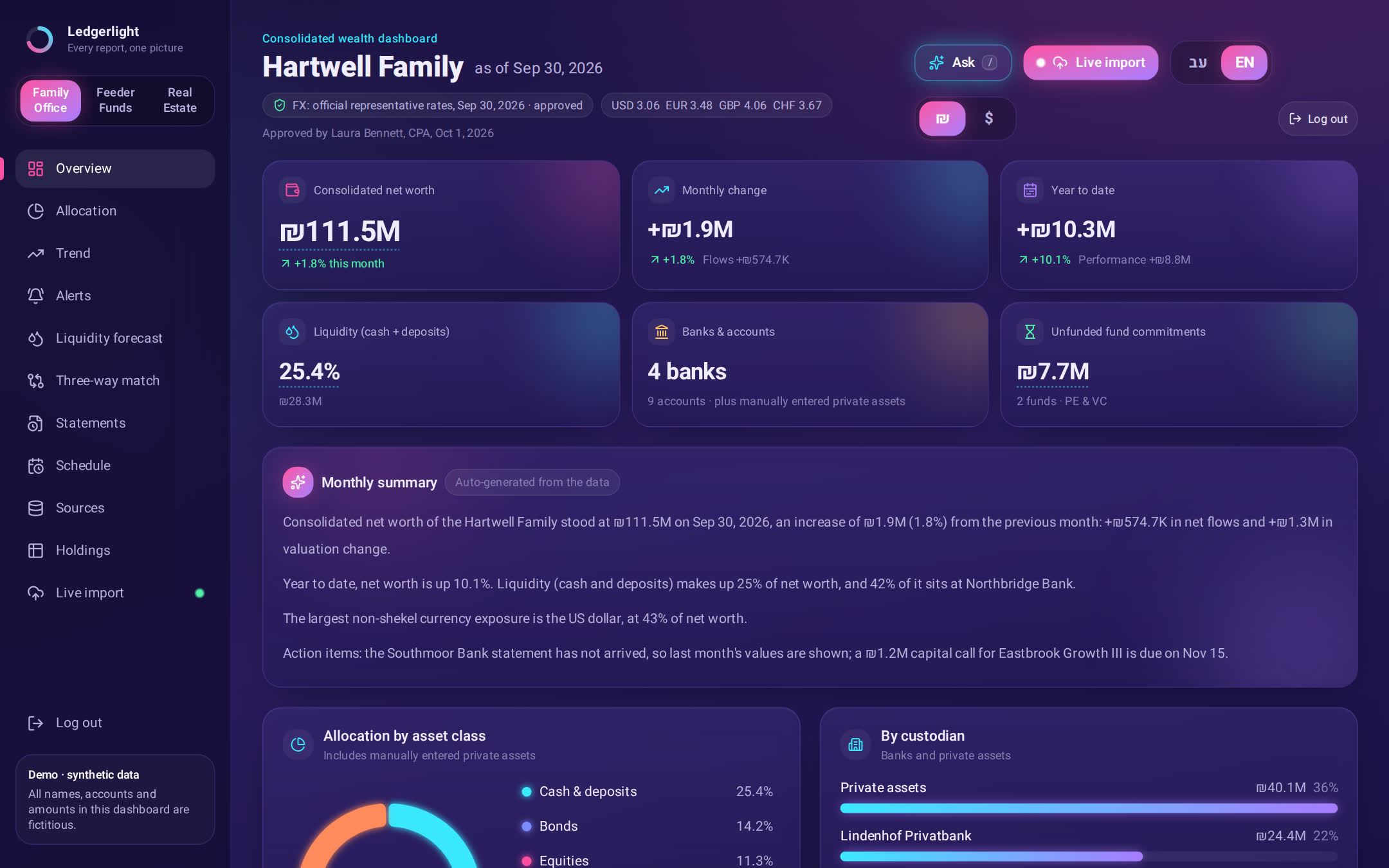
Consolidated net worth, allocation by asset class and custodian, and an automatically written monthly summary.
Synthetic demo data
Capabilities
What you get
Consolidated net worth
All entities, accounts and currencies, at official rates.
- Equities36%
- Bonds25%
- Cash22%
- Private17%
Private assets
PE, VC, real estate and funds, with commitments and unfunded balances.
Investor allocation
Every call and distribution split by each investor's share.
Call no. 10$850,312.29
Investor 01$56,687.49
Investor 02$42,515.61
Investor 03$28,343.74
…
Controls and reconciliation
Every number traced to its source, with an audit log for every change.
Live reconciliation
alpenrose-geneva-2026-09.pdfQuantity × price = value
5,800,000 × 101.7606% = 5,902,114.80
ISIN check digit
XS2961034472
NAV roll-forward
Δ $12.40 · bank fee
Statement date matches
30 Sep 2026 = 30 Sep 2026
All 4 checks passed
Automatic monthly report
What changed, why, and what needs attention.
Alerts
Concentration, missing statements, and the next calls from your capital call forecast.
New
Built for the back office
New client from their statements
Drop the first statements. Ledgerlight opens the client with accounts and values.
Entity and ownership map
Family, companies, trusts and accounts, with the ownership share and value at every node. Export to PDF.
Capital call forecast
Commitments, unfunded balance and the expected call schedule for every fund.
Ask your portfolio
Ask in plain words. Every answer names its source.
Export to your accounting system
A monthly Excel and a balanced journal file, debits equal credits, mapped to your chart of accounts, with the source of every line.
Client portal
Your client signs in and sees only the report you published.
Works with the systems you already have
Ledgerlight exports clean, reconciled data in standard formats (Excel, CSV journal entries, API) that load into your accounting, ERP, CRM and portfolio management systems.
Deployment
Installed for you, and yours to keep
Ledgerlight is installed for you and fitted to your statements and entity structure. Your data stays yours, and ongoing support and upgrades are optional.
Live in two weeks
We start from last month's statements and set up reconciliation with you. After that, the monthly consolidated view takes minutes.
Dedicated environment
No shared server with other clients. Role-based access and an audit trail.
Works alongside Addepar
On Addepar or another platform? Ledgerlight reads what it can't: PDF statements from banks, custodians and private funds, in any layout.
Security & deployment
Where your data runs
Choose how Ledgerlight is deployed and where your data is stored. Three deployment options, one product.
Cloud
Managed cloud
AI models run through AWS Bedrock in the region you choose, for example the EU. Your data stays within AWS.
Private cloud
Your private cloud
Deployed inside your own AWS, Azure or Google Cloud account, under your policies and controls.
On-premise
On your servers
Installed on your own infrastructure with local models. No data leaves your network.
Security principles, whichever option you choose
- Encryption in transit and at rest
- Role-based permissions
- A full audit log: every number traceable to its source
- Client data is never used to train models
- You choose where your data is stored
Built for GDPR and local privacy-regulation compliance
GDPR-readyEncrypted in transit and at rest
Deployed in your own AWS account, in the region you choose: the EU or any other AWS region. Ledgerlight has no access to your data.
The hosted demo runs in the US with sample data
Security questionnaire and architecture review available on request.
FAQ
Frequently asked questions
Does Ledgerlight replace Addepar or our current system?
No. It works next to it. Your existing systems keep handling the data that arrives through feeds; Ledgerlight reads everything that doesn't (PDF statements from foreign and smaller banks, private fund reports, capital calls and distributions, scans) and delivers it as clean, reconciled data ready to load.
Which statements can it read?
Statements from any bank, custodian or fund, in any format: PDF, Excel and scanned documents, in different languages. When it meets a new layout, your team approves the result once and it learns.
Where does our data live?
Your choice: a managed cloud, your own private cloud (AWS, Azure or Google Cloud), or your own servers with a local language model and no outside connection. Data is encrypted, access is role-based, every action is logged, and client data is never used to train models.
How do you prevent AI errors?
The AI never decides alone. Every statement goes through checks: line totals, quantity × price, NAV roll-forward and statement dates. Every number links to the document, page and row it came from, and anything that fails a check is flagged for review before it enters your data.
Do we own the system?
Yes. Ledgerlight is installed for you and can run without us, with documentation and ready infrastructure. Ongoing support and upgrades are optional.
How do we get started?
Bring last month's statements. We fit Ledgerlight to your sources and entity structure, and you are live within two weeks, reconciliation included, without changing how your team works.
Want to see it on your own statements?
A 20-minute demo: bring one statement and watch it get read, checked and consolidated.