Private banks
Your clients' statements from other banks, read and consolidated, with every number traced to its line.
Ledgerlight reads PDF and scanned statements in any layout and builds one view of the assets your clients hold elsewhere.
Security & deployment
Where your data runs
AWS
Your own AWS account
In your own AWS account and region. The vendor has no access unless you grant it.
Azure · Google Cloud
Your private cloud (scoped project)
Deployed inside your own Azure or Google Cloud account, under your policies and controls.
On-premise
On your servers (scoped project)
Installed on your own infrastructure with local models. No data leaves your network.
- Roles enforced in the database
- Two-factor sign-in mandatory for approvers and admins
- Append-only audit log, kept for 7 years
- Client data is never used to train models
- Encryption in transit and at rest
- GDPR-ready
Security overview and questionnaire answers for your due-diligence team, on request.
SecurityStatements from other banks, typed in by hand
Assets held elsewhere arrive as PDFs
Clients bring statements from other banks as PDFs and scans. Someone on the RM team types them in before a review meeting.
Every bank, its own layout
Each custodian formats positions, currencies and dates differently, so the whole-wealth view is rebuilt by hand each time.
Hard to show where a number came from
When a client questions a figure, finding the source page takes longer than the meeting.
1:1 traceability
A source behind every number
Point at any figure and see the statement it came from: the document, the page and the exact row, with the checks that ran on it.
- Document, page and row
- Checks on the figure and the statement
- Converted at the reference FX rate
Holdings · 30 September 2026
Hover over or tap a figure to see its source
Westmere Bank
USD current account · 1–30 Sep 2026
Checked: rows add up, totals, statement date
The work is far more efficient and accurate, and we have time for other things.
In monthly use at a family office, on real statements: from two days of work to minutes. Built by Aviad Gindi after a decade in investment management.
How it works
From the reports to one picture
Statements arrive
The RM team uploads the PDFs and scans a client brings from other banks.
- Scans
- Excel
Every figure is read and checked
Ledgerlight reads each position, currency and date, and checks the totals against the statement.
- Positions
- Currencies
- Statement totals
One view of assets held elsewhere
Holdings from every custodian consolidate into one view, each figure linked to its line.
- Consolidated view
- Source per figure
- Export
Product
How Ledgerlight solves it
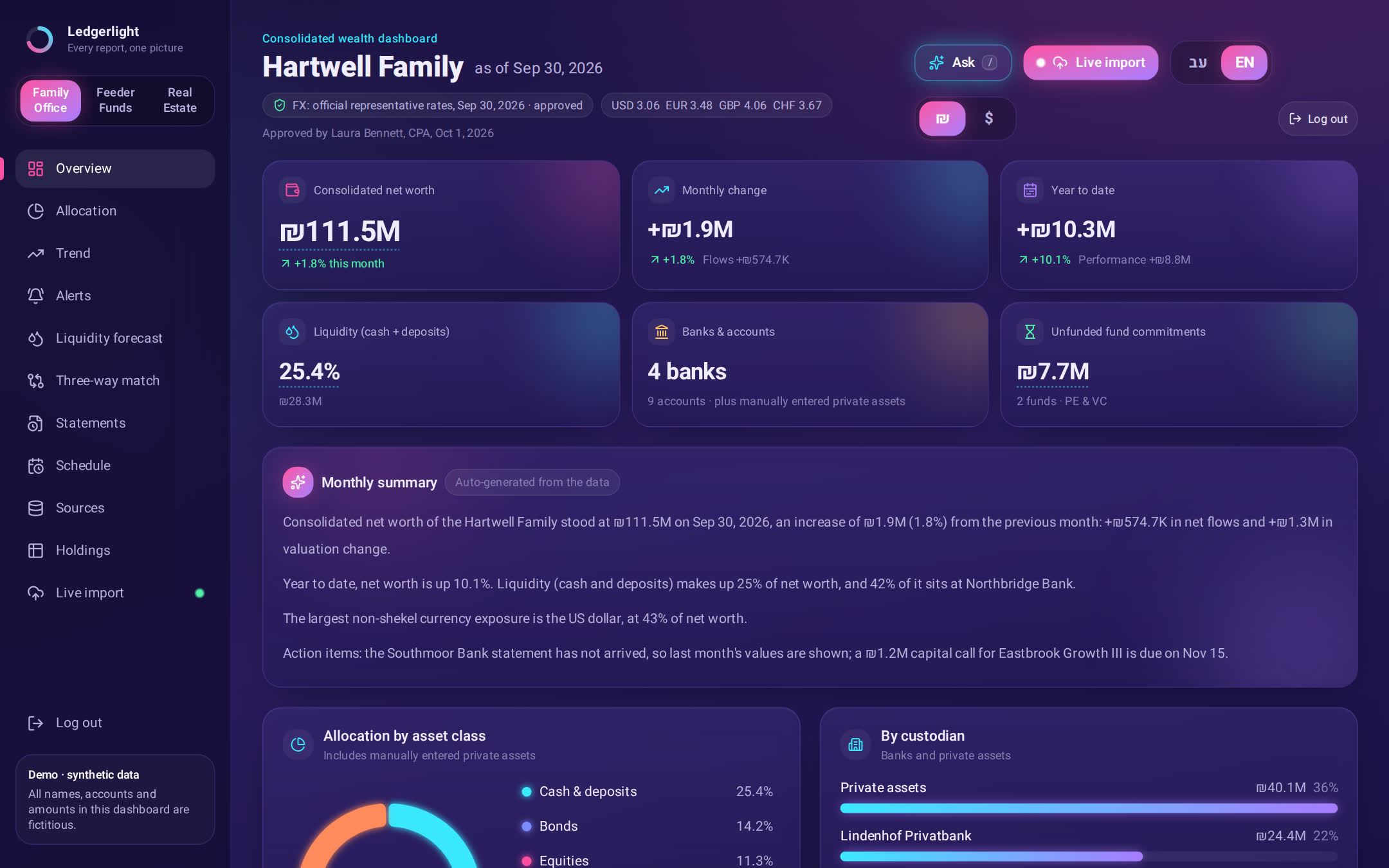
Consolidated net worth, allocation by asset class and custodian, and an automatically written monthly summary.
Synthetic demo data
Before and after
The same work, with Ledgerlight
Today, by hand: Statements from other banks are typed in before each review
With Ledgerlight: Each statement is read as it arrives, PDF or scan
Today, by hand: Each custodian's layout is rebuilt by hand
With Ledgerlight: Positions, currencies and dates from every custodian land in one view
Today, by hand: Finding the source page of a figure takes longer than the meeting
With Ledgerlight: Every figure opens the statement line it came from
Capabilities
What you get
Reads any format
Statements in PDF, Excel and SWIFT MT940, MT535 and camt.053 are read as they arrive.
Entities and currencies
Several entities and currencies, consolidated into one total at official FX rates.
Every number to its source
Every figure is matched to the document it came from, with an audit log for every change.
Journal-entries export
A balanced journal-entries file in SAP Business One DTW or Priority format, built from the saved transactions, with the source of every line.
Client portal
Clients sign in and see their own holdings and the reports you publish to them.
FAQ
Common questions
Where is the data kept?
In your own AWS account and region. The vendor has no access unless you grant it. Your own Azure or Google Cloud account, or your own servers, are available as a scoped project.
Is client data used to train models?
No. Client data is never used to train models, and it is encrypted in transit and at rest.
Who can see and approve figures?
Roles are enforced in the database, two-factor sign-in is mandatory for approvers and admins, and every action goes to an append-only audit log.
Can our due-diligence team review the security?
Yes. A security overview and answers to your questionnaire are available on request.
Want to see it on your own statements?
A 20-minute demo: bring one statement and watch it get read, checked and consolidated.